Quick in-page CSS testing for developers and designers
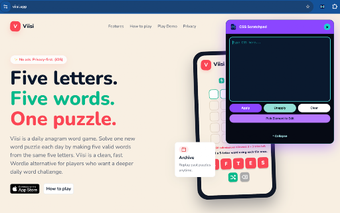
CSS Scratchpad, developed by wardtwits, is a lightweight Chrome extension for rapid CSS experimentation and visual testing. The tool injects CSS into live pages for immediate preview, enabling rapid visual testing and temporary style changes without modifying a site's source files or workflow. Key capabilities include real-time injection, a minimalist interface, zero-configuration setup, and a non-destructive testing environment for quick in-browser iterations and rapid previews. It targets web developers, UI designers, and students who need a fast sandbox for styling experiments.
Purpose-built for quick style prototyping
The app creates a compact editing pane that keeps styling work separate from a site's repository, giving designers a place to try ideas before committing changes. Its role is a short-lived workspace for visual testing and debugging, rather than a full authoring environment. That positioning makes it useful when a developer needs to validate a CSS rule on a live page without switching to a full code editor.
Minimal interface keeps focus on fast iterations
The extension emphasizes a small footprint and fast access, matching its description as "lightweight and minimalist." Users can open the editor quickly and apply rules without extra configuration, which suits brief, task-focused sessions. That design reduces friction during quick experiments, although it also means the tool lacks advanced session management expected in larger editing suites.
Open source code gives transparency about data handling
The developer maintains the project on GitHub, with source and documentation publicly available. Because the project is open source, reviewers can inspect how injected styles are applied and confirm that the extension operates locally in the browser. That visibility supports teams and learners who prefer inspectable tooling rather than closed binaries.
Fits alongside developer tools and Chromium browsers
The app complements, rather than replaces, browser developer tools; its extreme simplicity is a deliberate contrast to full inspectors. It can pull computed values from page elements and includes syntax highlighting to aid editing. The extension is built for Chrome and compatible Chromium browsers, so it integrates into workflows that already rely on that engine without extra platform setup.
Practical short-term styling tool, not a replacement for full development workflows
CSS Scratchpad is a pragmatic option for developers and designers who want a fast, temporary workspace for styling checks; it excels at short experiments and visual debugging. The trade-off is that it does not replace full debugging or source editing workflows. A practical tip: use the app to prototype rules, then move vetted styles into your source control system for persistent changes.